Collect Direct Debit payments with FastPay (UK BACS)
FastPay is a UK Direct Debit bureau. Connecting it lets you collect tuition fees by BACS Direct Debit straight from Zooza: you push a monthly collection to FastPay, and Zooza reconciles which payments were collected or failed — without exporting a spreadsheet or keying anything into a bank portal.
FastPay is UK only. In other regions it appears as Not available in your region.
How FastPay compares to the other Direct Debit options
Zooza supports three Direct Debit models. FastPay sits between the manual and the fully automated one:
| Manual / ERSTE (SEPA) | FastPay (BACS) | GoCardless (SEPA) | |
|---|---|---|---|
| Region | SEPA / EU | UK | SEPA / EU |
| Mandate setup | Customer sets up at their bank | Paper Direct Debit Instruction → you key it into the FastPay portal | Customer authorises online via GoCardless |
| Monthly collection | You export a file and import it into your bank | Zooza pushes the file to FastPay | Zooza charges via the GoCardless API |
| Outcome tracking | You check the bank manually | Zooza reconciles automatically (2–3 working days) | Automatic |
The key difference from the manual flow: with FastPay there is no spreadsheet and no bank-portal import for the collection — Zooza submits it for you and reports back the result.
Before you start
You need a FastPay bureau account. FastPay issues you a bureau token (your Bearer-Token) out-of-band — Zooza does not create it. If you have your own Service User Number (SUN), keep it handy; if you don't, Zooza falls back to FastPay's central bureau SUN automatically.
Step 1 — Connect FastPay
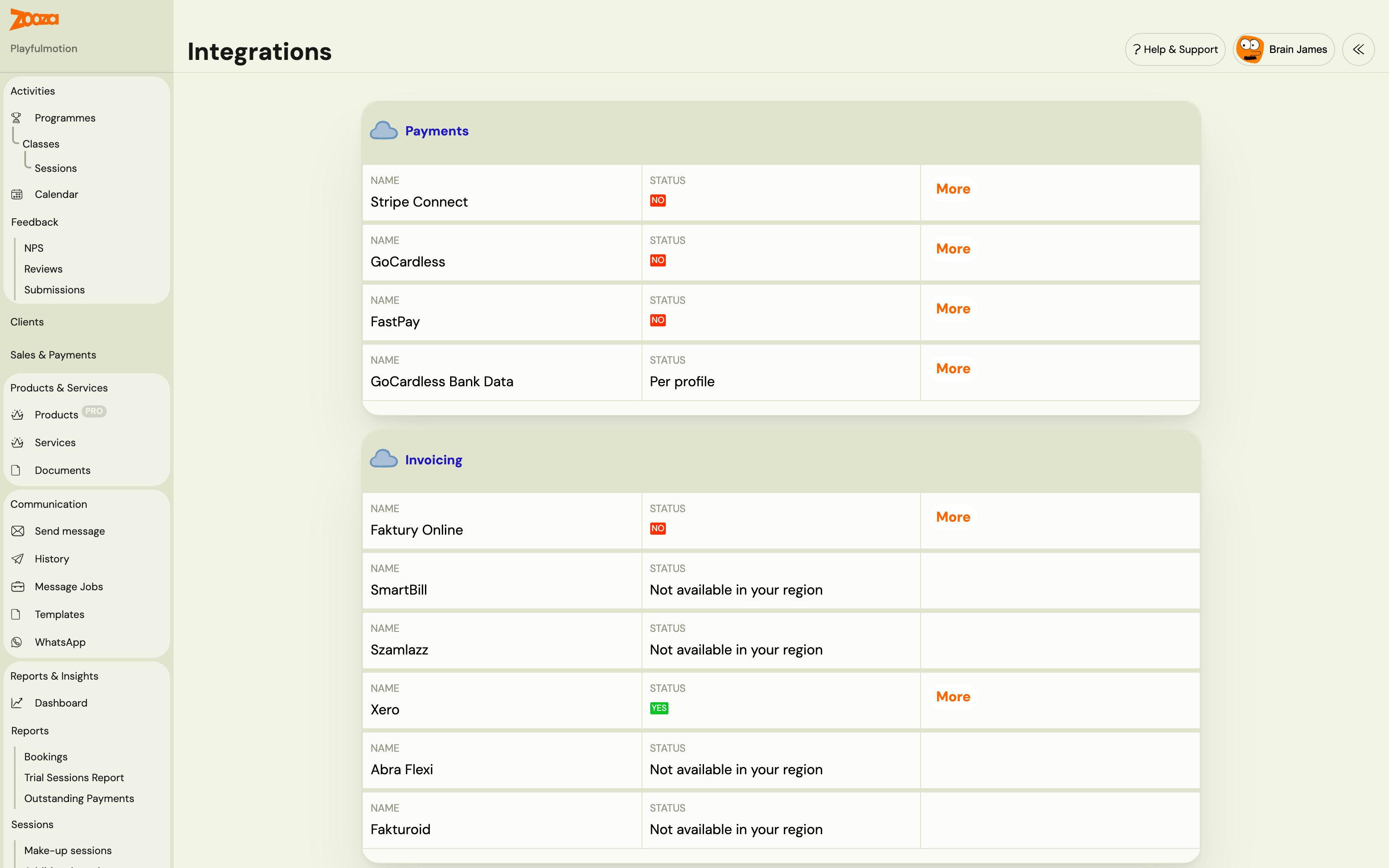
- Go to Team & Settings → Integrations.
- In the Payments section, find FastPay and click More.
- Paste your FastPay bureau token — Zooza stores it securely and never shows it again.
- (Optional) Enter your own Service User Number (SUN). Leave it empty to use FastPay's bureau SUN.
- Click Connect FastPay.
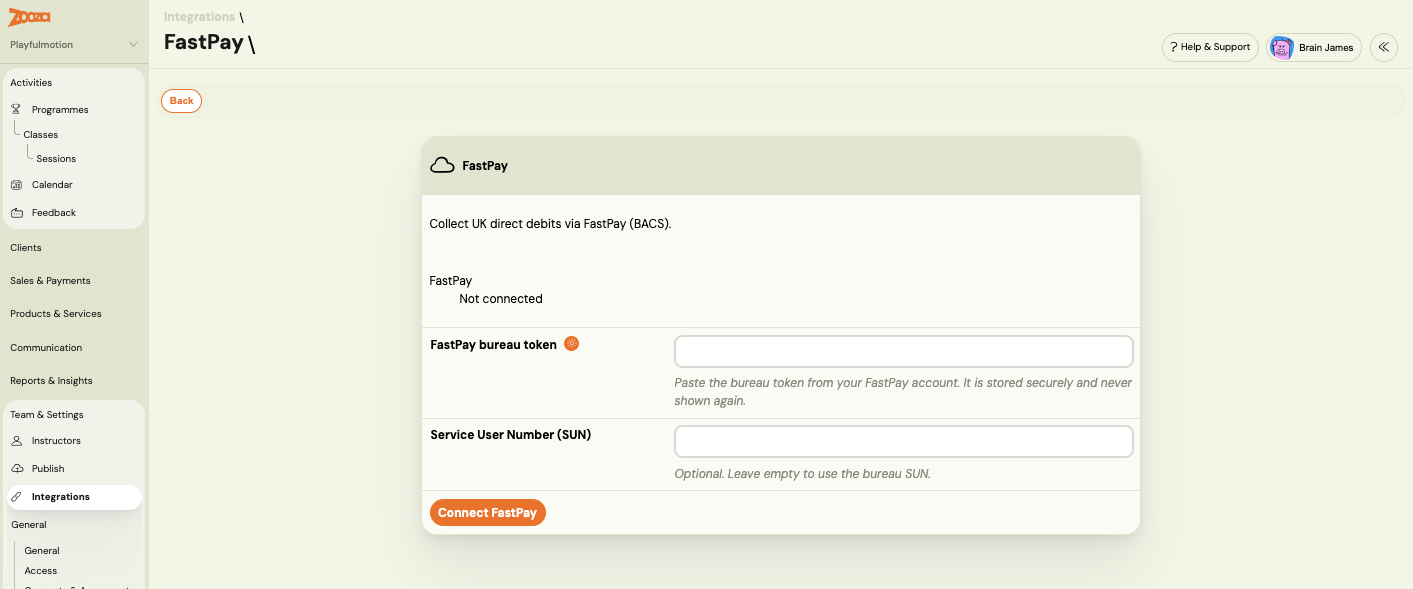
Zooza checks the token against FastPay immediately. If it's valid, the status changes to Connected. If it's rejected, you'll see an error and nothing is stored — re-check the token with FastPay.
The token is stored encrypted and never shown again. Return to Team & Settings → Integrations → FastPay any time to check the status or disconnect.
Step 2 — Set a course or product to collect via FastPay
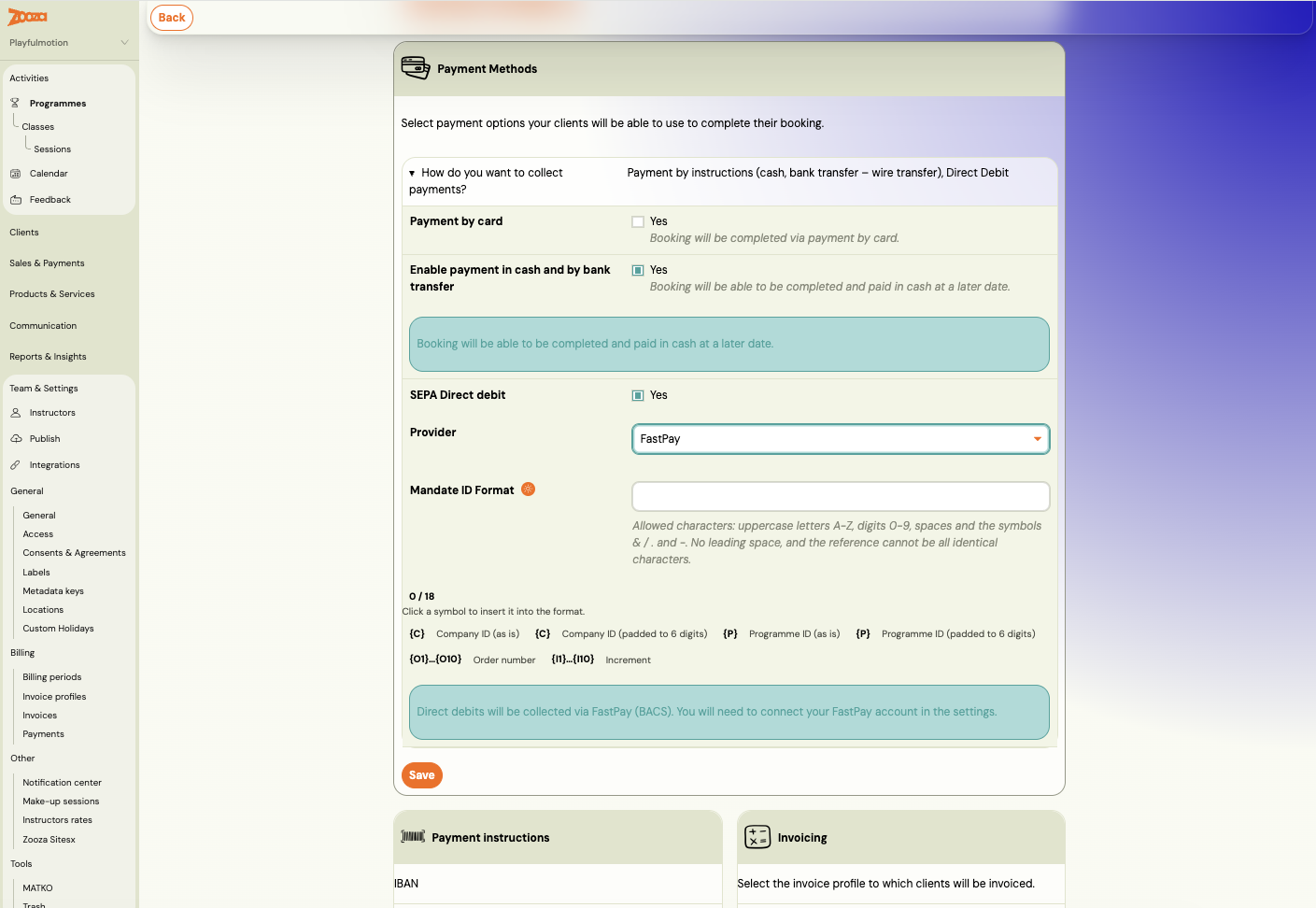
- Open the course or product and go to its Payment Methods settings.
- Turn on SEPA Direct debit, then set the Provider to FastPay. (The toggle is labelled SEPA Direct debit; selecting FastPay as the provider switches that course to UK BACS collection.)
- Set the Mandate ID Format — the pattern Zooza uses to generate each mandate's reference (the FastPay
DDReference).
BACS reference rule: the generated reference must be up to 18 characters, uppercase letters and digits, and unique. If your format would produce a reference that breaks these rules, Zooza warns you when you save — not later at booking time. (For comparison, SEPA mandates allow up to 35 characters, so a format that worked for ERSTE may be too long for BACS.)
For how the Mandate ID Format tokens work, see Price and payment setup.
Step 3 — Capture the customer's bank details
To collect by BACS, Zooza needs the customer's sort code, account number, and account-holder name. There are two ways these reach Zooza:
- At booking (recommended). When the course collects via FastPay, the registration widget asks the customer for their UK bank details. This is the primary path and also lets Zooza pre-fill the Direct Debit Instruction for them.
- Entered by you. If a customer returns a paper form, you can add or edit the bank details on the mandate in Zooza.
The account-holder name is its own field — it may differ from the payer (for example a company account, a joint account, or a parent paying for a child). Always capture it as it appears on the bank account. Sort codes and account numbers keep their leading zeros.
Step 4 — The customer sets up the mandate
BACS mandates are not created through Zooza or the FastPay API. The flow is:
- The customer completes a paper Direct Debit Instruction (DDI) — account-holder name, sort code, account number, their bank details, and a signature.
- They return it to you (the merchant).
- You key it into the FastPay portal, which lodges the mandate under FastPay's bureau.
To reassure the customer, you can include the DD_SETUP_INSTRUCTIONS merge variable in a confirmation email. For BACS it confirms there's nothing further for them to do — Zooza already has their bank details and you set up the mandate — and shows their reference and the Direct Debit Guarantee.
Zooza can optionally generate a pre-filled DDI (with the reference and your bureau details) for the customer to sign, when bank details are captured through the widget.
Step 5 — Push a monthly collection
When it's time to collect, you push a batch to FastPay from Sales & Payments → Payments → Direct Debit, on the FastPay tab.
- Set the collection period — from, to, and the charge date.
- Choose what to include: Current debt (debt already issued), Scheduled debt (debt due within the range), and Class by client (group all of a client's payments together).
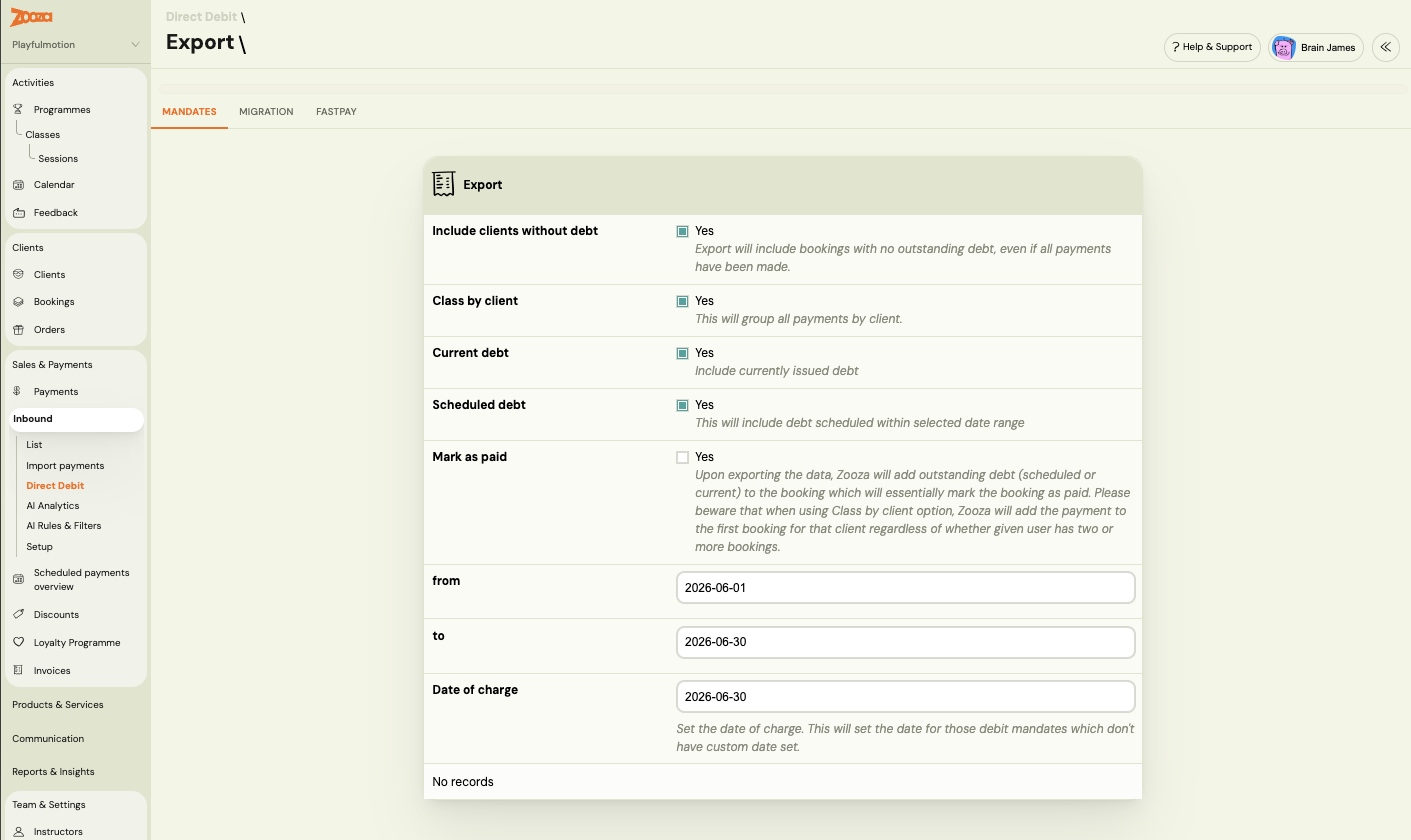
- Preview the batch — Zooza shows every payer who will be charged, their reference, and the amount.
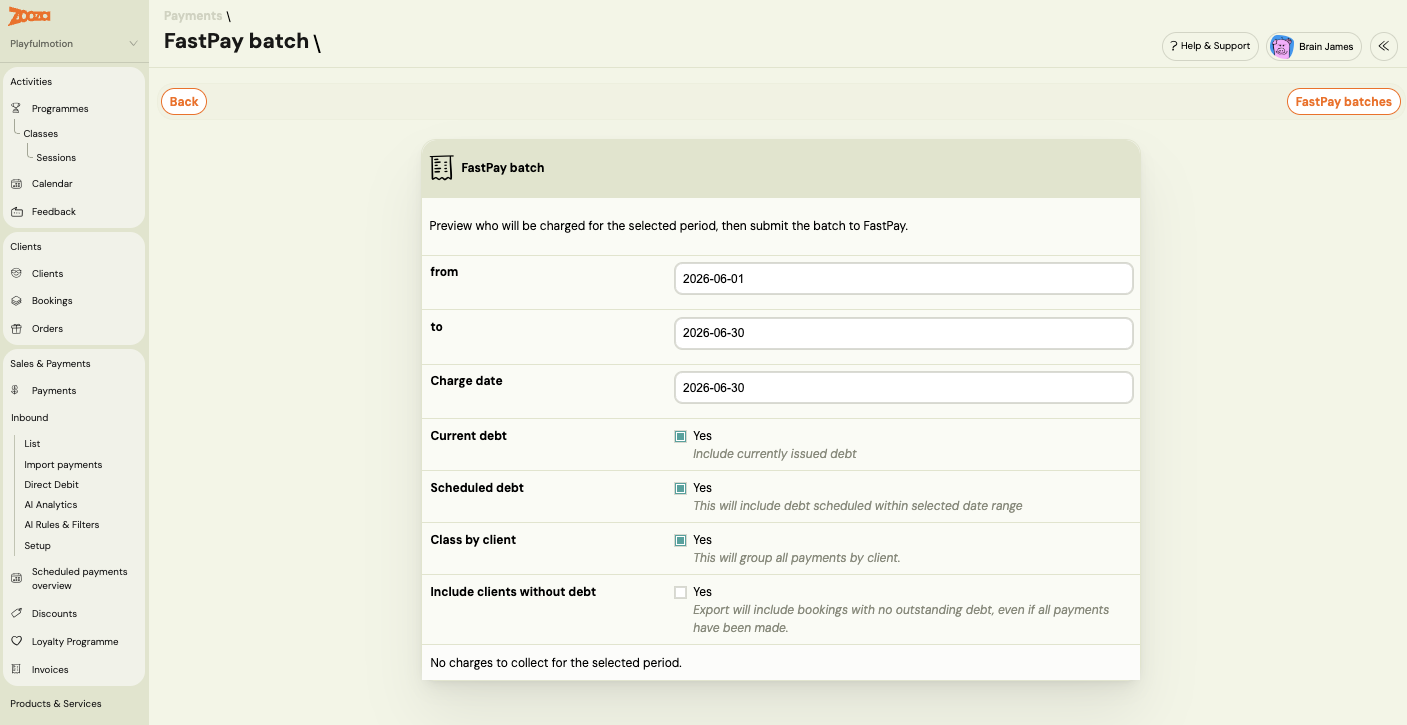
- Submit the batch to FastPay.
Zooza builds the BACS collection file, submits it to FastPay, and creates one pending charge per payer. If FastPay rejects the file, no batch is created and no charges are made — you'll see the error. You can review past batches and their outcomes from FastPay batches.
⚠️ Never push the same period twice. FastPay does not detect duplicate files — submitting the same collection again would charge every customer a second time. Zooza blocks a second push for a period that has already been submitted.
This is a manual push (a button you click each period). Automatic monthly scheduling is planned for a later release.
Step 6 — Reconciliation happens automatically
BACS settles 2–3 working days after submission, so charges stay pending for a few days. You don't need to do anything — Zooza checks FastPay daily and updates each charge:
- Collected → Zooza records a Direct Debit payment against the booking and updates the order status.
- Failed / bounced → Zooza marks the charge as failed and sends you a system message in your admin inbox, with the bounce reason. (This is the same failed-payment notification you already get for offline charges — nothing extra to set up.)
Batch report
To see how a past collection turned out, open the batch report. For each batch it shows how many charges were collected, failed, or still pending.
Mandate cancellations
If a customer cancels their Direct Debit at their own bank, Zooza detects it (the mandate is reported Cancelled or Expired), deactivates the mandate so it is skipped in future pushes, and notifies you with a system message. This protects you from submitting a collection against a dead mandate.
Refunds
FastPay has no refund API. If you need to refund a collected Direct Debit, do it manually in the FastPay portal, then correct the payment in Zooza. See Payment correction vs refund.
Related
- Integrations — where you connect FastPay and other payment providers
- Price and payment setup — Mandate ID Format and payment plans
- How to assign Direct Debit mandates to bookings (GoCardless) — the SEPA/GoCardless equivalent
- FastPay FAQ