Record why bookings get cancelled
Since the end of October 2026, cancelling a booking requires a reason. The reason is saved with the booking, together with who cancelled it and when, and it feeds a Cancellations report that tells you where you are losing people.
Before this, the only "why" Zooza ever recorded was an automatic marker for non-payment, and nothing recorded who did it. So a leaver was a leaver, whether they had left unhappy or whether an admin had simply created the booking twice by mistake.
This is not the same as a session cancellation reason. When a parent cancels their child out of one session — Sickness, Travel — that is attendance, and it lives on the session. This page is about cancelling the booking: the client is leaving the class. See Attendance and make-ups for the other one.
Your list of reasons
Go to Settings → General and find the Cancellation reasons card. You need owner-level access to change it.
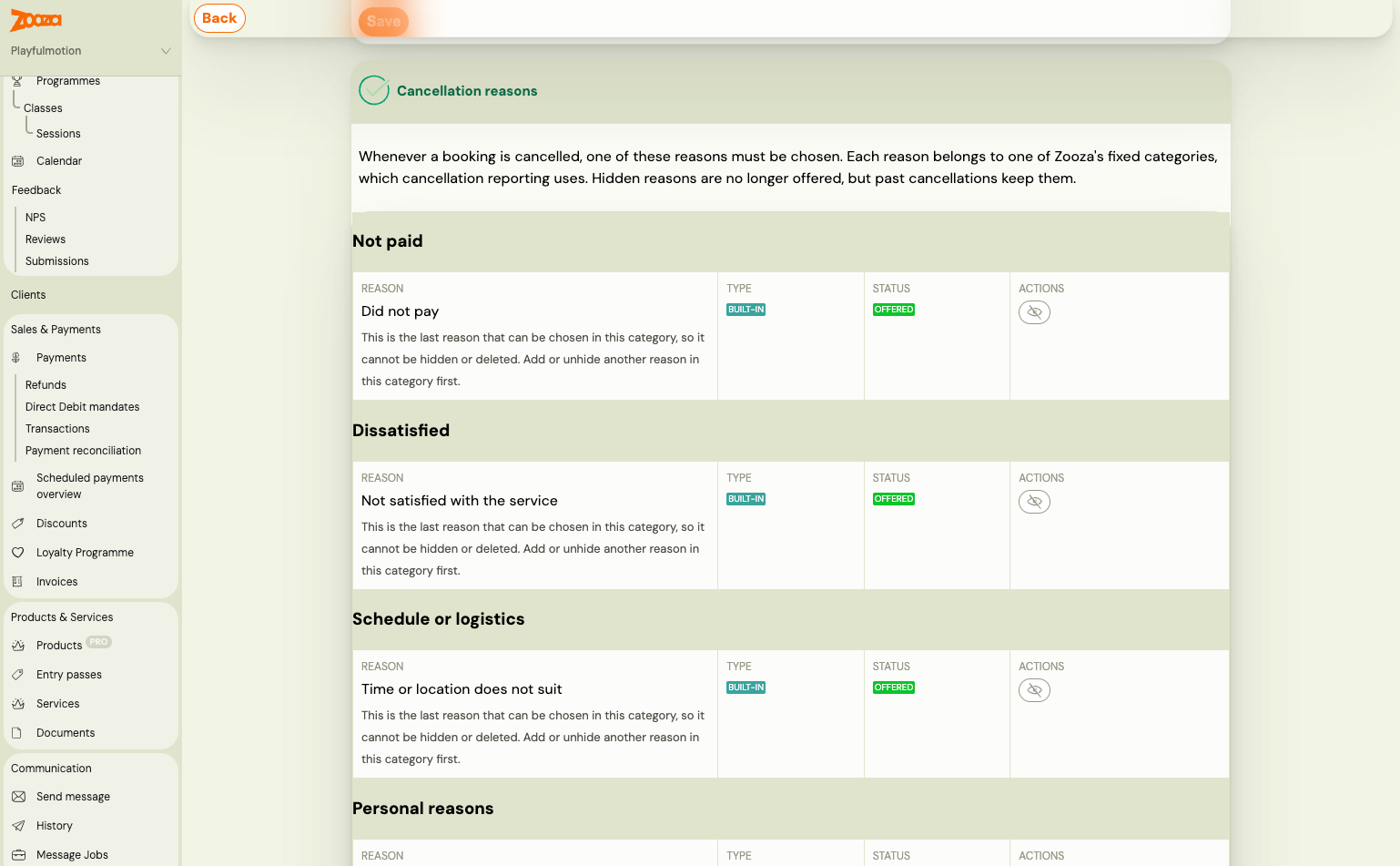
The reasons are grouped under their category, and each row shows its type (Built-in or your own) and its status (Offered, or hidden).
Zooza ships a list to start from:
| Reason | Use it for |
|---|---|
| Did not pay | They never paid and you are closing the booking |
| Not satisfied with the service | They were unhappy with the class, the instructor, the room |
| Time or location does not suit | Nothing wrong with the class, wrong slot for this family |
| Too expensive | Price was the reason given |
| Personal or family reasons | Illness, moving away, a new baby — nothing you could have changed |
| Booking created by mistake | An admin correction. Not counted as a cancellation |
| Other reason | The catch-all. Worth keeping small |
Two more are set by Zooza itself and cannot be chosen by hand: Cancelled automatically for non-payment, and Network transfer for a client moving to another unit of your network. Neither counts as a cancellation in the rates.
Rename them to your own words. Add your own with Add reason. The list is yours — these are just a sensible start.
Every reason sits in a category, and the category is what reporting uses
When you add or edit a reason you pick its Category. The report groups by category, not by your wording, which is what lets you rename "Too expensive" to "Price" without breaking last year's numbers.
The categories are fixed by Zooza: Not paid, Dissatisfied, Schedule or logistics, Personal, Price, Other, Administrative correction, Transfer and Unknown. The last two are Zooza's own — Transfer is set when a client moves to another unit of your network, and Unknown holds cancellations recorded before reasons existed. Neither can be picked by hand.
Three rules that follow from reasons being saved on real bookings:
- Renaming a reason also changes the label on past cancellations. It is the same reason, better worded.
- Moving a reason to another category affects only future cancellations. Past ones stay in the category they had, so historical reports do not shift under you.
- Hiding or deleting a reason keeps it on past cancellations. It is simply no longer offered. A hidden reason shows as "(hidden)" where it was used before.
You cannot hide or delete the last remaining reason in a category — add or unhide another one in that category first. Otherwise a cancellation in that category would have nothing to choose.
Cancelling a booking
The Cancellation reason picker is now part of cancelling, and it is required. Pick the closest reason and cancel as you always did.
Two things worth knowing when it misbehaves:
- "There is no cancellation reason to choose from" means every reason has been hidden. The booking cannot be cancelled until you unhide one in Settings → General.
- If the list fails to load, the cancellation is refused rather than going through without a reason. Try again.
Afterwards the booking shows Cancellation reason, and Cancelled by name · date. Where Zooza cancelled it — the unpaid automation, say — it says Zooza.
The Cancellations report
Reports & Insights → Reports → Cancellations. It answers two questions: why people leave, and where they leave more than they should. It is marked Beta — the shape may still change.
Not the same as the "Cancelled" report. Further down the same menu, under Sessions, there is a Cancelled report — that one is about cancelled sessions. This one is about clients leaving.
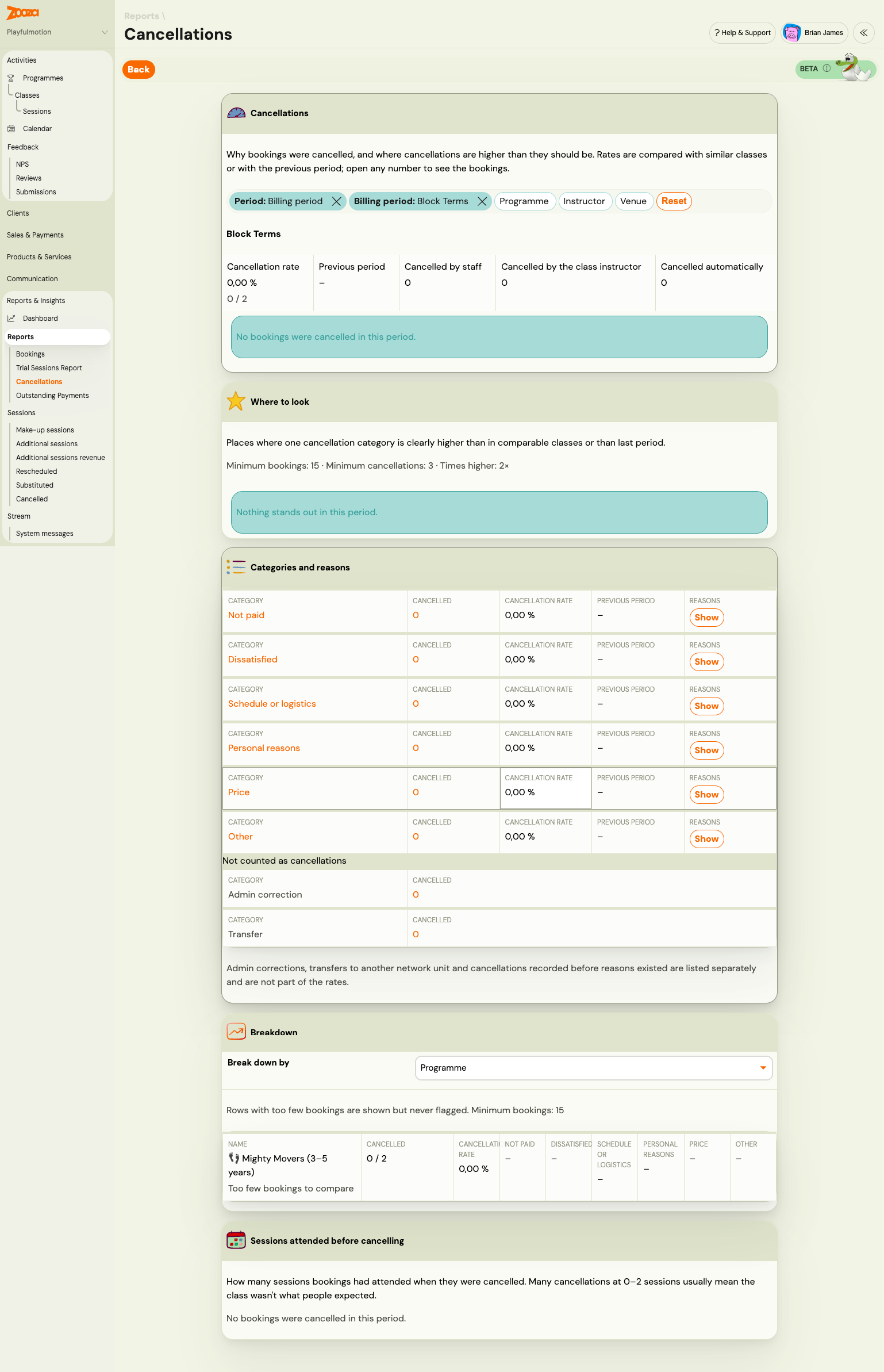
Filter first. Across the top: Period and Billing period (both removable), plus Programme, Instructor and Venue, and Reset to clear them. Everything below reacts to these.
The rate, with something to compare it to. Your cancellation rate for the period,
shown as a percentage and as the fraction behind it (0 / 2), against the previous
period. Beside it, who did it: cancelled by staff, by the class instructor, or
automatically.
Read the fraction, not only the percentage. Two bookings and one leaver is 50% and means nothing.
Where to look
The card that earns the report. Zooza looks for a category clearly higher in one place than in comparable classes or than last period, and names what it found in plain words — Instructor: clients leave dissatisfied, Venue: hard to get to, Day and time don't suit, Price: more cancellations than last period, Payment method: bookings go unpaid, Programme: people leave in the first sessions. Each opens to the bookings behind it.
The thresholds are printed on the card so you know what it is holding itself to: minimum 15 bookings, minimum 3 cancellations, and at least 2× higher. Below any of those it stays quiet rather than crying wolf — which is why a small account can legitimately see "Nothing stands out in this period."
Read this card before the numbers. The rate tells you how you are doing; this tells you what to change.
Categories and reasons
One row per category — Not paid, Dissatisfied, Schedule or logistics, Personal reasons, Price, Other — with how many cancelled, the rate, the previous period, and Show to expand the individual reasons underneath.
Beneath them, kept deliberately apart under Not counted as cancellations: Admin correction and Transfer, plus anything recorded before reasons existed. They are counted and shown, just not in the rates — "admin corrections, transfers to another network unit and cancellations recorded before reasons existed are listed separately and are not part of the rates."
This is the whole point of the categories. Without them your churn figure quietly includes every double entry an admin ever tidied up.
Breakdown
Break down by programme, class, instructor, venue, room, day and time, payment method, billing period, month or reason — whichever cut you are arguing about. The table gives each row its cancelled count and rate, then a column per category, so you can see what kind of leaving happens where.
Rows with too few bookings are shown but never flagged, and say "Too few bookings to compare". Same 15-booking floor as the hotspots.
Sessions attended before cancelling
How far people got before they left. A pile at 0–2 sessions almost always means the class was not what those parents expected — a trial, booking-page or expectation problem, not a teaching one. A spread across the term is ordinary churn.
If you run a network
A network HQ can manage one list for every unit, from Cancellation reasons in the network app.
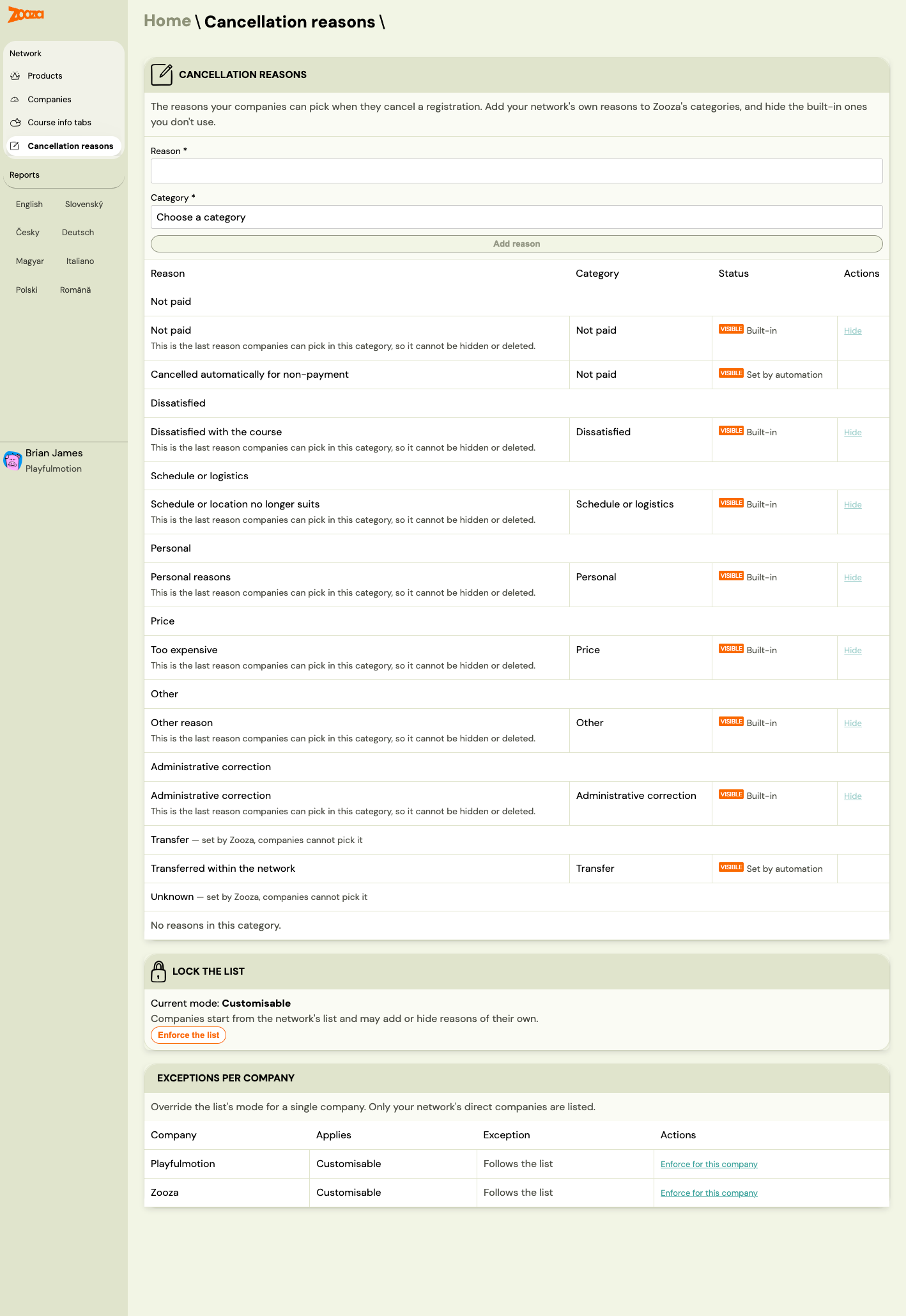
There the HQ adds its own reasons to Zooza's categories and hides the built-in ones it does not use. Two controls decide how much freedom the units get:
- Lock the list. Customisable means "companies start from the network's list and may add or hide reasons of their own"; Enforce the list takes that away.
- Exceptions per company overrides the mode for one direct company — handy when the list should be open in general but fixed for one branch.
On a unit under an enforced list it reads "Your network manages this list, so it cannot be changed here", and the reasons shown are the ones offered when cancelling.
- Reset to network list undoes your changes to the reasons that came from the network — renaming, moving, hiding, deleting. Your own reasons are untouched.
- Set aside by your network holds your own reasons that the network put aside. They are not offered any more, past cancellations keep them, and you can Restore them individually or all at once.