King of a class
King of a class is a feature that lets one client manage make-up session attendance on behalf of all registrations in a class. Instead of each participant booking or cancelling their own make-up sessions individually, the designated king handles it for the entire class.
Prerequisite: This feature is only available in classes where custom make-up sessions (self-replacement) are enabled. If make-up sessions are not enabled on the class, the King of a class option will not appear.
How it works
- The king is assigned to a booking (registration), not to a person. If a client has multiple bookings in different classes and is set as king on only one of them, they can only manage attendance for that one class.
- A class can have more than one king at a time. Each king manages make-up session for the whole class simultaneously.
- Once a king is set, all other participants in the class lose the ability to book or cancel make-up sessions individually. The king takes over this responsibility for everyone.
- Individual participants can still opt out on their own — they are not forced to follow the king's decisions.
Set a king
- Open the booking you want to designate as king.
- Go to the Attendance tab.
- Click Set as King of the class.
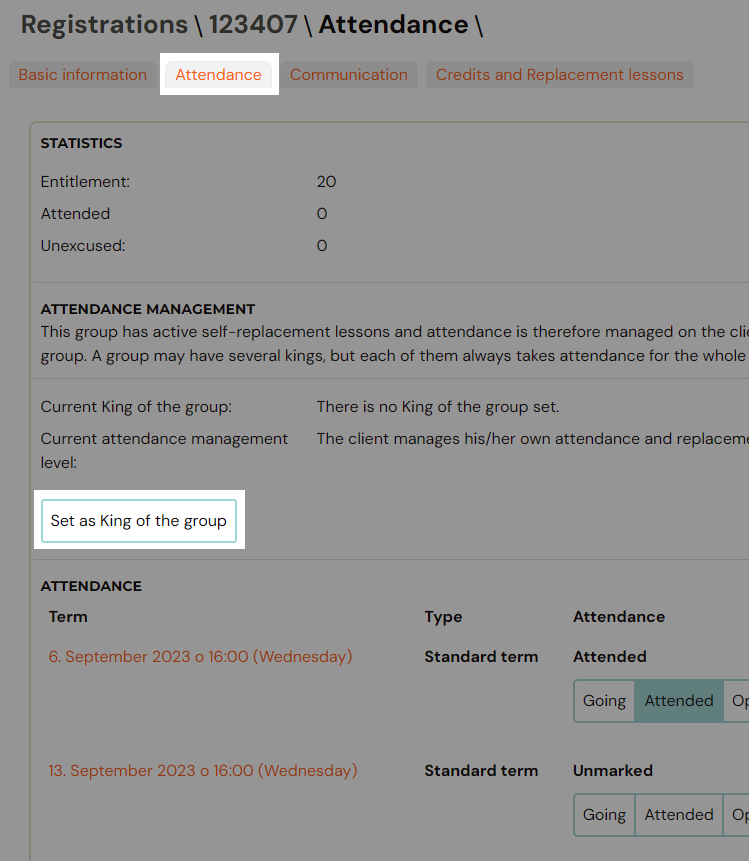
Once a king is set, any other booking in the same class will show who the current king is in the Attendance Management section.
Remove a king
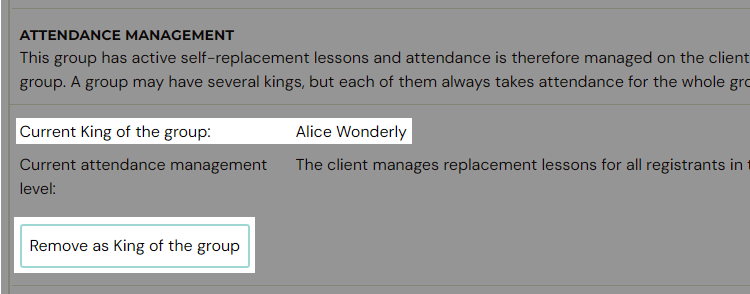
On the king's booking, go to the Attendance tab and click Remove as King of the class. This returns attendance management back to individual participants.
Related
- Make-up session — complete guide — full guide on how make-up sessions work.
- Make-up sessions FAQ
- Instructor attendance management