Oblio Integration
Oblio is a Romanian cloud accounting platform. When connected, Zooza creates invoices directly in your Oblio account, which automatically submits them to ANAF (Romania's tax authority) — no manual filing required.
Market: Romania Setup effort: Enter credentials + document series
Before you start
You need an active Oblio account with at least one document series created. The document series must exist in Oblio before you configure it in Zooza — invoice creation will fail without it.
Setup
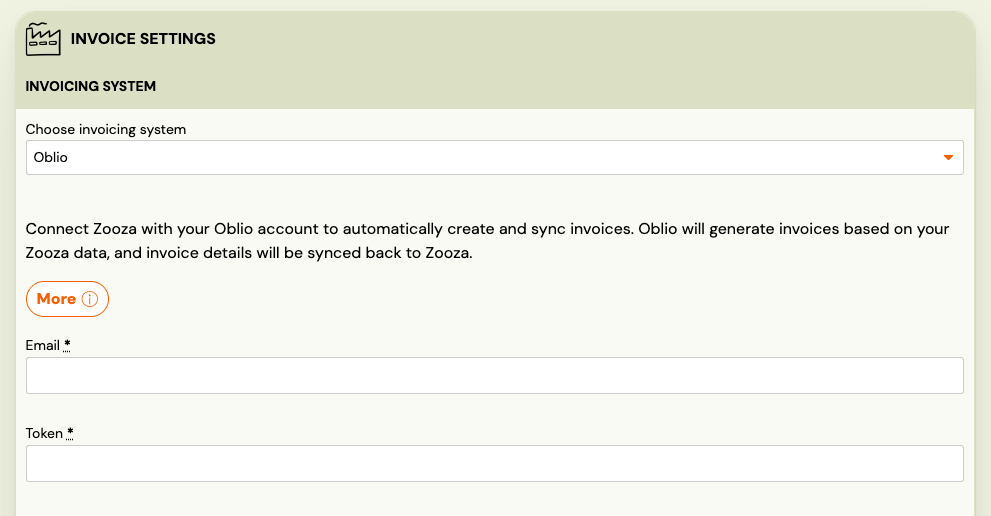
- Go to Settings → Billing & Payments and open your Invoice Profile.
- In the Invoice Engine section, select Oblio.
- Enter your Oblio email address and API token.
- Find the API token in your Oblio account under Account settings → API.
- Enter the Document Series — this controls invoice numbering. It must already exist in your Oblio account.
- Click Save.
How invoices work
Once connected:
- Every time a payment is recorded in Zooza, an invoice is created in your Oblio account.
- In production, Oblio automatically submits each invoice to ANAF — you are legally compliant without any manual steps.
- The connection refreshes automatically — no periodic re-authorization needed.
- PDF is available for download after the invoice is created.
What works and what doesn't
| Feature | Status |
|---|---|
| Invoice creation | ✓ Automatic |
| ANAF submission | ✓ Automatic in production |
| PDF generation | ✓ Available after creation |
| Re-authorization | Not needed — connection refreshes automatically |
| Credit notes | ✗ Not supported — issue in Oblio directly |
| Editing invoices after creation | Edit in Oblio — changes sync back to Zooza only after a manual refresh |
Known issues
Document series not configured — If no document series is set, invoice creation will fail with an error. Make sure you create a series in Oblio first, then enter it in the Zooza Invoice Profile settings.
Test environment — Oblio has a test environment. Invoices created there are not submitted to ANAF. Confirm your setup works in test before switching to production credentials.
Related
- Invoicing overview — how invoice engines work
- Billing and invoicing — Invoice Profiles, auto/manual generation, multi-line
- Invoices list — browsing and downloading invoices