Classes List
The Classes screen shows all timetables (classes) across all programmes in a single, filterable table. Use it to get a cross-programme view of your schedule, occupancy, financials, and instructors.
Navigation: Go to Activities → Classes.
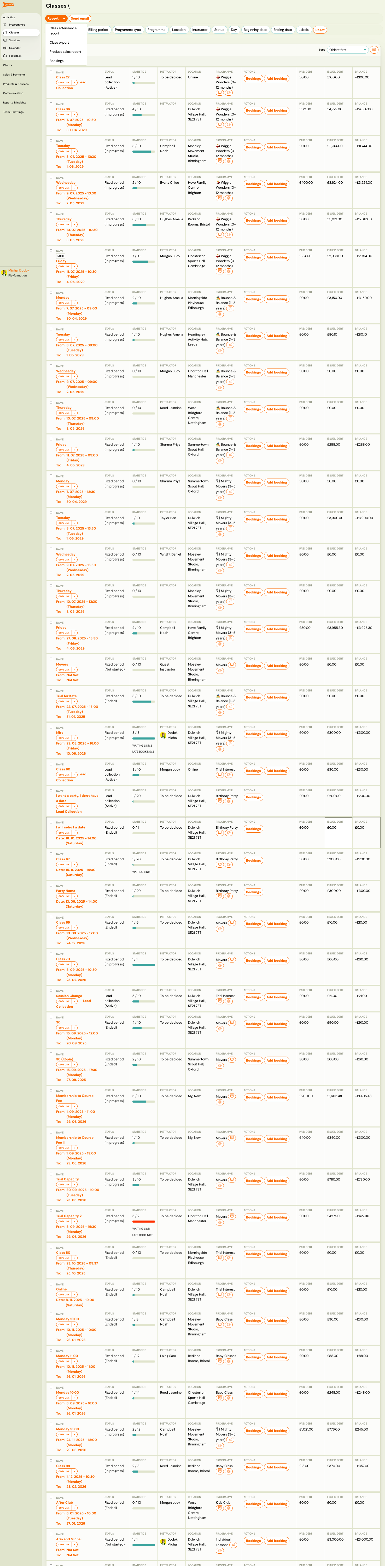
List View
The table supports two export options at the top: Export (standard) and Fixed export (predefined format). A Product sales report link is also available.
Filters
| Filter | Description |
|---|---|
Name | Free-text search by class name. |
Billing period | Filter by billing period (e.g., "Ongoing Classes"). |
Programme type | Filter by programme structure. |
Programme | Filter by specific programme. |
Location | Filter by venue. |
Instructor | Filter by assigned instructor. |
Status | Filter by class status: in progress, scheduled, ended, or Archived. Use Archived to find classes that have been hidden from the active list. |
Day | Filter by day of week. |
Beginning date / Ending date | Filter by date range. |
Labels | Filter by programme labels. |
Search | Apply the selected filters. |
Table Columns
| Column | Description |
|---|---|
Name | Class name (clickable — opens class detail). Includes Copy link button and status indicator. |
Date range | Start and end dates with day-of-week and time. |
Billing period | Payment grouping (e.g., "Ongoing Classes"). |
Programme type | "Fixed period" / "Lead collection" + status ("in progress", "Scheduled"). |
Programme | Parent programme name. |
Location | Venue name and address. |
Instructor | Assigned instructor. |
Status | Occupancy indicator (e.g., coloured bar). |
Day | Day of the week. |
Registrations | Number of active bookings (highlighted in orange if near capacity). |
Actions | Bookings and Add booking buttons. |
| Financial columns | Paid debt, Issued debt, Balance — payment totals for the class. |
The total number of records is shown above the table. Results can be sorted by various columns.
Related
- Creating a class — step-by-step guide to creating a new class.
- Class Detail — the detail view for a single class.
- Programmes List — managing programmes and their classes.
- Programme Class Session Definition Guide — how to set up class structures.