Sessions List
The Sessions screen shows all individual sessions across all programmes and classes in a single chronological list. Use it to see your complete day-by-day schedule, check instructor assignments, and access session details.
Navigation: Go to Activities → Sessions.
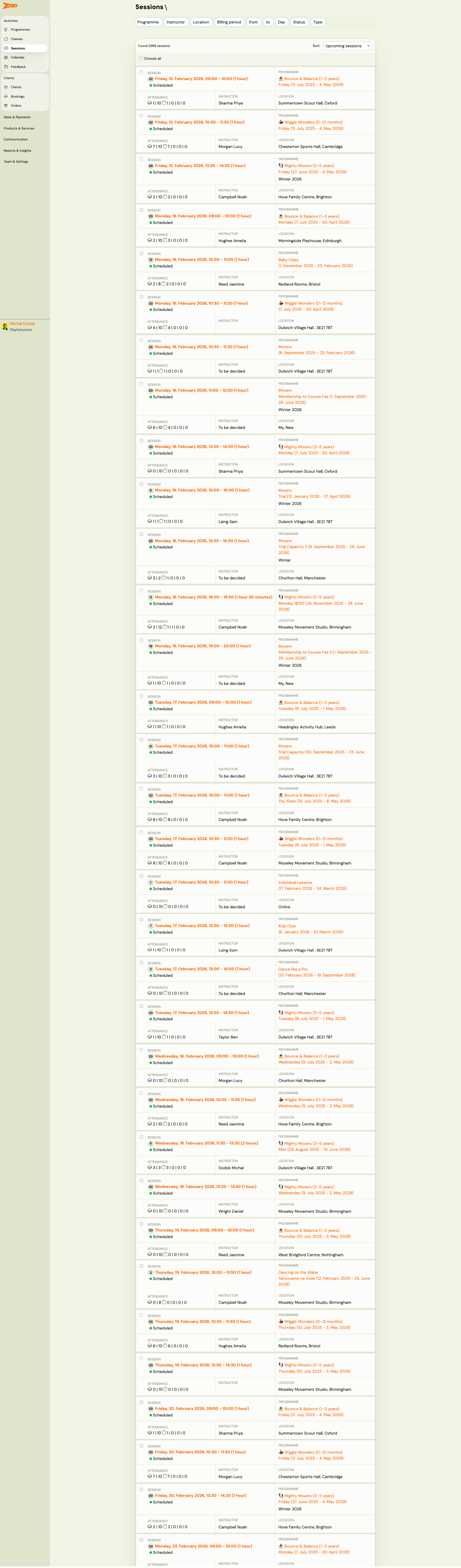
Filters
| Filter | Description |
|---|---|
Programme | Filter by specific programme. |
Instructor | Filter by instructor. |
Location | Filter by venue. |
Billing period | Filter by billing period. |
From / To | Date range filter. |
Status | Filter by session status. |
Type | Filter by session type — see values below. |
Type filter values
| Value | Description |
|---|---|
| All | No filter — shows all session types. |
| Session over capacity | Sessions where the number of enrolled clients exceeds the class capacity. Use this to find and resolve over-capacity situations. |
| Session under capacity | Sessions with available slots — useful for spotting classes with low fill rate. |
| Custom make-up session | Sessions created as a custom make-up (requested by a client, approved by instructor). |
Tip: Use Session over capacity to quickly identify sessions where attendance exceeds the maximum. This can happen when a client books a make-up slot in a class that is full, and then a regular client subsequently re-registers — the regular client has priority but the make-up booking remains, temporarily creating over-capacity. Review the session detail to decide whether to remove the make-up or increase the class limit.
Results can be sorted by Upcoming sessions (default) or other criteria.
Session List
Each session row shows:
| Element | Description |
|---|---|
| Session date and time | Full date with day of week, start and end time (e.g., "Friday, 13. February 2026, 10:00 – 11:00 (Fixed)"). |
| Status badge | Colour-coded: green = scheduled, orange = in progress, etc. |
| Detail link | Opens the session detail with attendance tracking. |
| Instructor | Assigned instructor name. |
| Programme and class | Programme name, class name, and date range. |
| Attendance icon | Quick-view of attendance status. |
The total number of sessions found is shown at the top (e.g., "Found 846 sessions"). Use Choose all to select all sessions for bulk operations.
Related
- Classes List — the cross-programme classes view.
- Class Detail — managing a single class with its sessions.
- Calendar — visual calendar view of sessions.
- Edit Sessions in Programmes Guide — modifying session dates and times.
- Attendance and Catch-ups FAQ — marking attendance.