Understanding the Cancellation Log
When a client or admin cancels attendance on a session, Zooza records every decision made during the process — whether the deadline was enforced, whether a replacement credit was issued, and why. This log is visible in the session audit trail.
Use it to answer common questions like:
- "Why was this client able to cancel after the deadline?"
- "Why didn't they get a replacement credit?"
- "Why was the credit limit not applied?"
Where to find the cancellation log
- Open the booking detail.
- Go to the Attendance section.
- Find the cancelled session and click on the audit entry or expand the cancellation record.
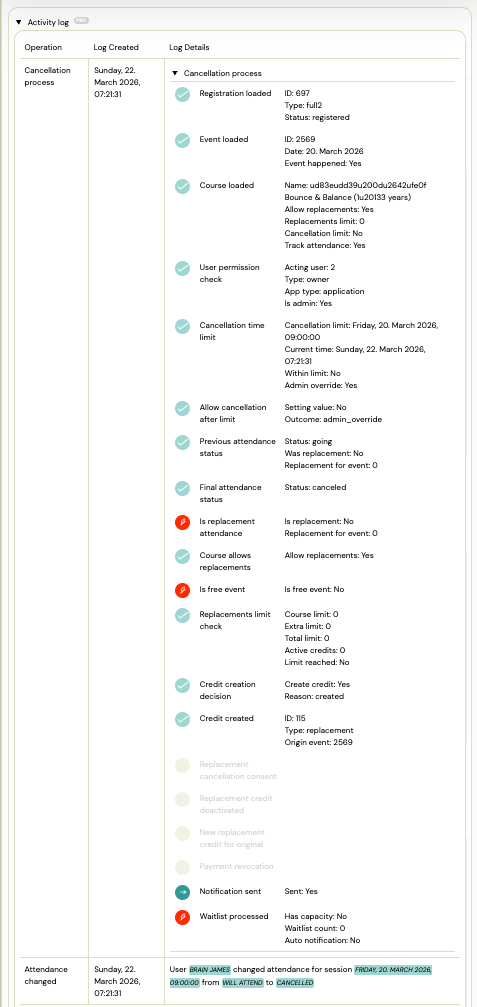
The log shows each decision point with its result (passed / skipped / blocked) and the values used at the time of cancellation.
What the log records
Cancellation deadline check
Whether the cancellation happened within the allowed window. The log captures:
- The configured deadline (e.g., 24 hours before the session)
- The actual time of cancellation relative to the session
- Whether the deadline was enforced or bypassed (e.g., admin override)
Replacement credit decision
Whether a replacement session credit was issued. The log captures:
- Whether the programme has replacements enabled
- Whether the client had already reached the replacement limit
- Whether the cancelled session was itself a replacement (replacements of replacements are not credited)
- The final decision: credit issued or not
Admin override
If an admin cancelled on behalf of a client outside the normal deadline window, this is recorded as an override. The log shows who performed the action.
Common scenarios explained
| Situation | What the log will show |
|---|---|
| Client cancelled before deadline, got credit | Deadline check: passed. Credit: issued. |
| Client cancelled after deadline, no credit | Deadline check: failed. Credit: not issued (deadline not met). |
| Admin cancelled after deadline | Deadline check: bypassed (admin action). Credit: depends on programme settings. |
| Client reached replacement limit | Deadline check: passed. Credit: not issued (replacement limit reached). |
| Cancellation of a replacement session | Credit: not issued (replacements of replacements not allowed). |
Frequently asked questions
Can I change the outcome of a past cancellation?
No. The log is read-only. If you need to manually issue a replacement credit or reverse a cancellation, use the booking's Attendance actions to add a session or adjust the status directly.
Who can see the cancellation log?
Any admin with access to the booking can view the log.
Does the log appear for group cancellations?
Yes. When a session is cancelled for an entire class, each individual booking generates its own cancellation log entry.